Awareness
“I didn’t realize how many calories I was eating until I started tracking. Seeing everything clearly really helps.”

Selma A.


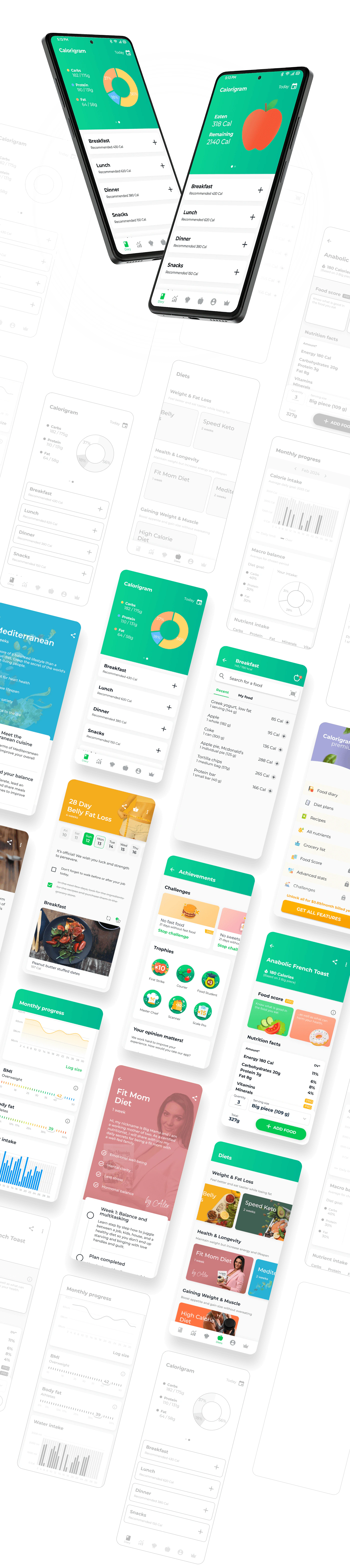
Calorigram is a calorie counter and food tracker that helps users build healthier eating habits through simple tracking and personalized nutrition guidance.
Problem
Most calorie tracking apps feel complicated and repetitive, making it hard for users to stay consistent with healthy eating.
Solution
Calorigram simplifies nutrition tracking with personalized plans, macro tracking, and an intuitive experience that helps users stay on track every day.
The insights helped identify opportunities to create a simpler, more motivating, and visually approachable experience for Calorigram.

Onboarding
Creating a profile at launch takes too much time.

Other features
Flashy AI food search tools, but their results are inaccurate.

Price
Big gaps between pricing plans.
General look
Many apps suffer from cluttered screens lacking hierarchy.

Tailoring
Heavy focus on weight loss can alienate other users.
Database
User-created food items reduce database accuracy.
I conducted 1:1 user interviews to understand users’ needs, motivations, and pain points, helping inform design decisions.
Awareness
“I didn’t realize how many calories I was eating until I started tracking. Seeing everything clearly really helps.”
Selma A.
Meal Ideas
“I always run out of ideas for healthy meals. Personalized suggestions would make eating better much easier.”

Johanes H.
Habits
“I don’t want a strict diet. I just want to build healthier habits that I can actually maintain.”

Alice L.
Progress
“I want to actually see progress — calories, macros, streaks, and habits that keep me motivated.”

Dann P.
Goals
“I want to lose weight without feeling overwhelmed by numbers, restrictions, or complicated plans.”

Janice N.
Motivation
“I try to eat healthier every Monday, but calorie tracking always becomes too complicated after a few days.”

Sarah D.
An intuitive layout that makes key features easy to find and use.
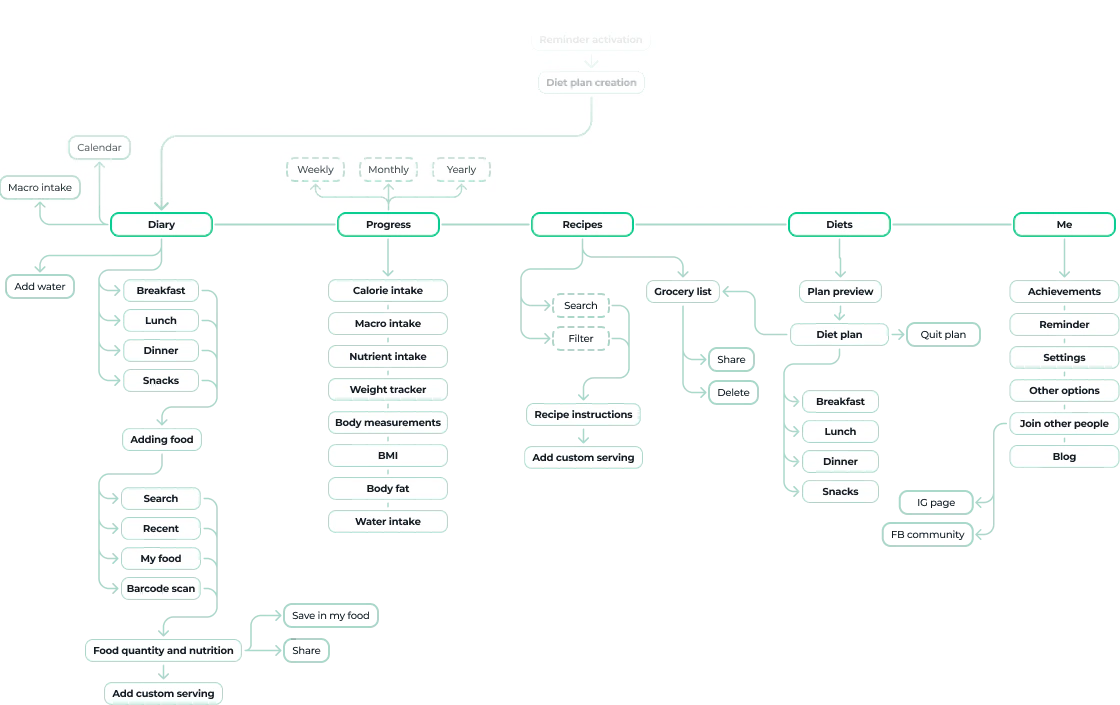
The visual design focuses on a clean, modern interface that makes calorie tracking feel simple, approachable, and easy to stay consistent with.
Montserrat
Yellow looked appealing, but since warm colors like yellow and red are often associated with fast food, green was chosen instead. It feels healthier, more neutral, and reinforces positive lifestyle choices.
#ACB1DB
Pro Content
#00C853
Accent Light
#0AD293
Accent
#00B791
Accent
100%
#111C26
T. Primary
70%
#111C26
T. Secondary
30%
#111C26
T. Inactive
12%
#111C26
Divider
High-fidelity designs were created to visualize the final look and feel of the app before development.